
Overview
Pikolo is a minimalist expense tracker app for iPhone, made for young adults who want to see where their cash goes and stop overspending. Every entry is one of four flows: spending, income, borrow or lending. A daily budget and a monthly budget sit on top of those flows. The home screen tells you how much of today's budget is left the moment you log a purchase.
The project started with Kevin, our design engineer, as a solo spare-time build during the Apple Developer Academy Indonesia. The problem was personal. Kevin could not keep track of where the cash went each month. Pikolo became Kevin's first app on the App Store. It went live in September 2023 as a free download in the Finance category, and version 1.0.1 followed four days later.
The challenge
Money for a student or a first jobber does not only move between you and a shop. A friend covers your lunch. You pay for someone's ride home and expect it back. Those debts are real cash flow. A tracker that only knows income and spending has to file them as one or the other, or leave them out. Either way, the number on the screen stops matching the money in your pocket.
The second problem is timing. Overspending happens one coffee at a time, yet most budgets are set once a month. A monthly figure is easy to ignore on day three. Kevin wanted a limit you feel during the day, something Kevin called an emotional buffer.
The third constraint was effort. If logging a purchase takes longer than making it, people stop logging. The app had to be quick enough to open several times a day.
Our approach
Discovery
Pikolo was built from lived experience, and the first user was the person building it. The four flow types came straight out of that experience. Borrow and lending sit next to spending and income as equals, because that is how money moved through a real month for the audience we had in mind. We kept the scope narrow on purpose. There is no bank sync, no sign-up and no investment advice.
Design
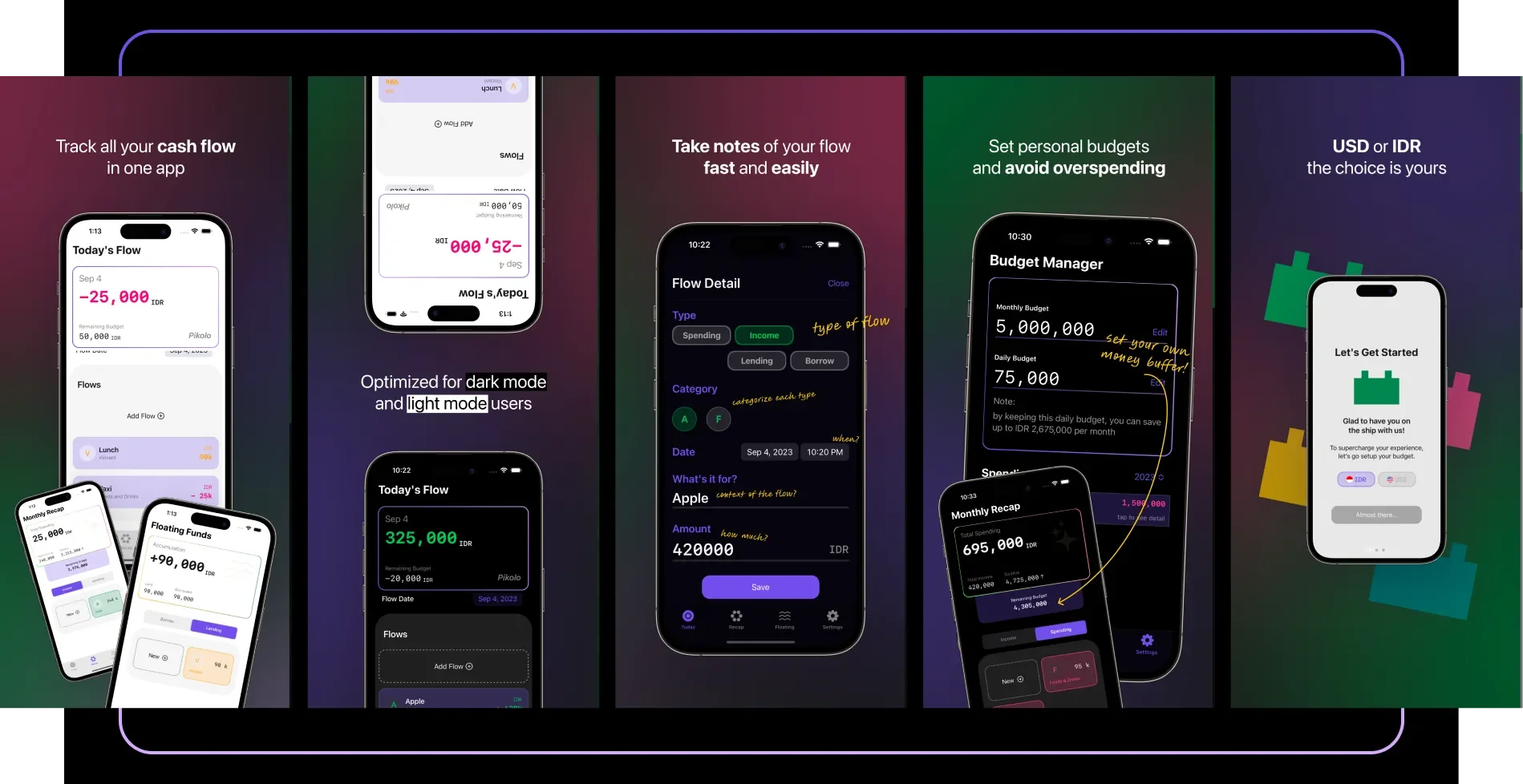
The Today screen leads with a single card. It shows the date, the day's net flow in large monospaced numerals, and the remaining daily budget underneath. Positive days read green and negative days read pink, so the sign of the day is clear at a glance. The list of the day's flows sits below, with an Add Flow button at the top of it.
Adding a flow opens one short sheet. You pick a type, pick a category, confirm the date and time, write what it was for, and type the amount. On the Today screen, income amounts show in green and spending in pink. For the App Store screenshots we annotated each field in handwriting ("type of flow", "how much?") so a new user understands the form before installing.
The budget lives in its own Budget Manager. You set a monthly budget and a daily budget. Below them, a note works out how much you would save in a month if you stayed within the daily figure. A Spending History list then shows each past month with what you spent and what you saved.
Setup is a short onboarding flow. You choose Indonesian rupiah or US dollars, then set your budget, and you are on the Today screen. Pikolo ships with both a light theme and a dark theme.
Build
Pikolo is a native iPhone app written in SwiftUI, with Core Data storing entries on the device. The privacy policy states that the information you enter stays on your device and is not collected by the developer. The App Store build is about 1.5 MB. It runs on iOS 16 and later, and it is free with no account.
Shipping was part of the work, including a support page, terms, a privacy policy and five store screenshots that explain the app. The 1.0.1 update, four days after launch, fixed a crash that could happen after deleting an entry, and it added tap anywhere to close the keyboard on the flow inputs, a small fix that makes repeated entry less fiddly.
Key features
- Four flow types, spending, income, borrow and lending, picked with one tap
- A Today screen with the day's net flow and the remaining daily budget
- A one-sheet entry form with type, category, date and time, a note and the amount
- A Budget Manager with monthly and daily budgets and a projected monthly saving
- A Monthly Recap with total spending, total income and the budget left for the month
- A Floating Funds view that collects money borrowed and money lent, on separate tabs
- A choice of rupiah or US dollars at setup
- Light and dark themes
What we learned
Treating debts as their own kind of flow was the most useful call in the project. Once borrow and lending had a home, the daily total matched the cash in hand. Floating Funds then put every open debt on one screen.
We built the app around the daily budget on purpose. A small number you see every day is easier to act on than a monthly total you check at the end. The saving projection in the Budget Manager gives that daily limit a reason.
Small, local and free was a deliberate trade. Pikolo does not ask you to link a bank or create an account. In return it stays small and keeps your entries on your phone. For a personal finance tracker aimed at people who are just starting to manage their own money, we think that trade is right.
Pikolo was also Kevin's first full App Store release. The legal pages, the store listing and the fast follow-up fix are the same parts we now handle for clients.
Build your own finance app with us
If you are planning a budgeting app, an expense tracker or any iPhone product where daily habits matter more than feature count, we would like to hear about it. ADA Studio designs and builds native apps in Jakarta, from the first flow on paper to the App Store listing. Tell us what you are working on and we will come back with how we would approach it.